> ## Documentation Index
> Fetch the complete documentation index at: https://docs.zayo.com/llms.txt
> Use this file to discover all available pages before exploring further.
# Create a Dedicated Internet Access (DIA) Connection with BGP
[DIA BGP](dia-overview#dia-bgp) is a type of Dedicated Internet Access (DIA) connection that uses Border Gateway Protocol (BGP) to route traffic to the internet using your own public IP addresses and Autonomous System Number (ASN).
Think of it like choosing to use your own address label and delivery route rather than having someone else assign one to you. This gives your organization more control over how your traffic flows, and allows you to use your existing network identity on the platform.
DIA BGP is best suited for organizations that already manage their own public IP space and ASN, and have network engineers on hand to configure BGP on their end.
## Before you begin
To create a DIA BGP connection, you need:
* An active customer port in DynamicLink.
* An [approved ASN](asn) in DynamicLink.
* Public IP prefixes registered to your ASN that you intend to advertise.
You'll also need the following information from Zayo, which is provided during or after provisioning:
* Zayo BGP peer IP address (IPv4 and/or IPv6)
* Zayo remote ASN (`6461`)
* BGP authentication password
* Maximum prefix limit for the service
## Create a DIA BGP connection
Navigate to **Build Your Network > Virtual Circuit**. Click **Add Connection**.
**"A" Port**
Select **Customer Port** and then complete the following fields:
| Field | Description |
| -------- | -------------------------------------------------------------------------------------------------------------------- |
| **Port** | Select your source port. |
| **VLAN** | Enter an available VLAN or enter "Native" to automatically direct traffic without using a VLAN ID. |
| **BW** | Select a bandwidth capacity for the connection. You can later edit the connection to increase or decrease bandwidth. |
**"Z" Port**
Select **Internet** and then complete the following fields:
| Field | Description |
| ---------------------------- | ------------------------------------------------------------------------------------------------------------------------------------------------------------------------------------------------------------------------------------------------------------------------------------------ |
| **Public IP** | Select **Use BGP**. |
| **ASN** | Select the approved ASN you want to use for this connection. |
| **Allow asymmetric routing** | Allows outbound and return traffic to take different network paths through Zayo's network. Most customers leave this disabled, since asymmetric routing prevents proper firewall enforcement on the connection. Enable only if your network design specifically requires asymmetric paths. |
| **BW** | This will automatically update to match the bandwidth you selected for your port. |
Enter a connection name and then click **Add**.
The connection will appear in your virtual circuit list in a pending state. It will remain pending until your router is configured and the BGP session establishes between your network and Zayo's.
## Configuration details
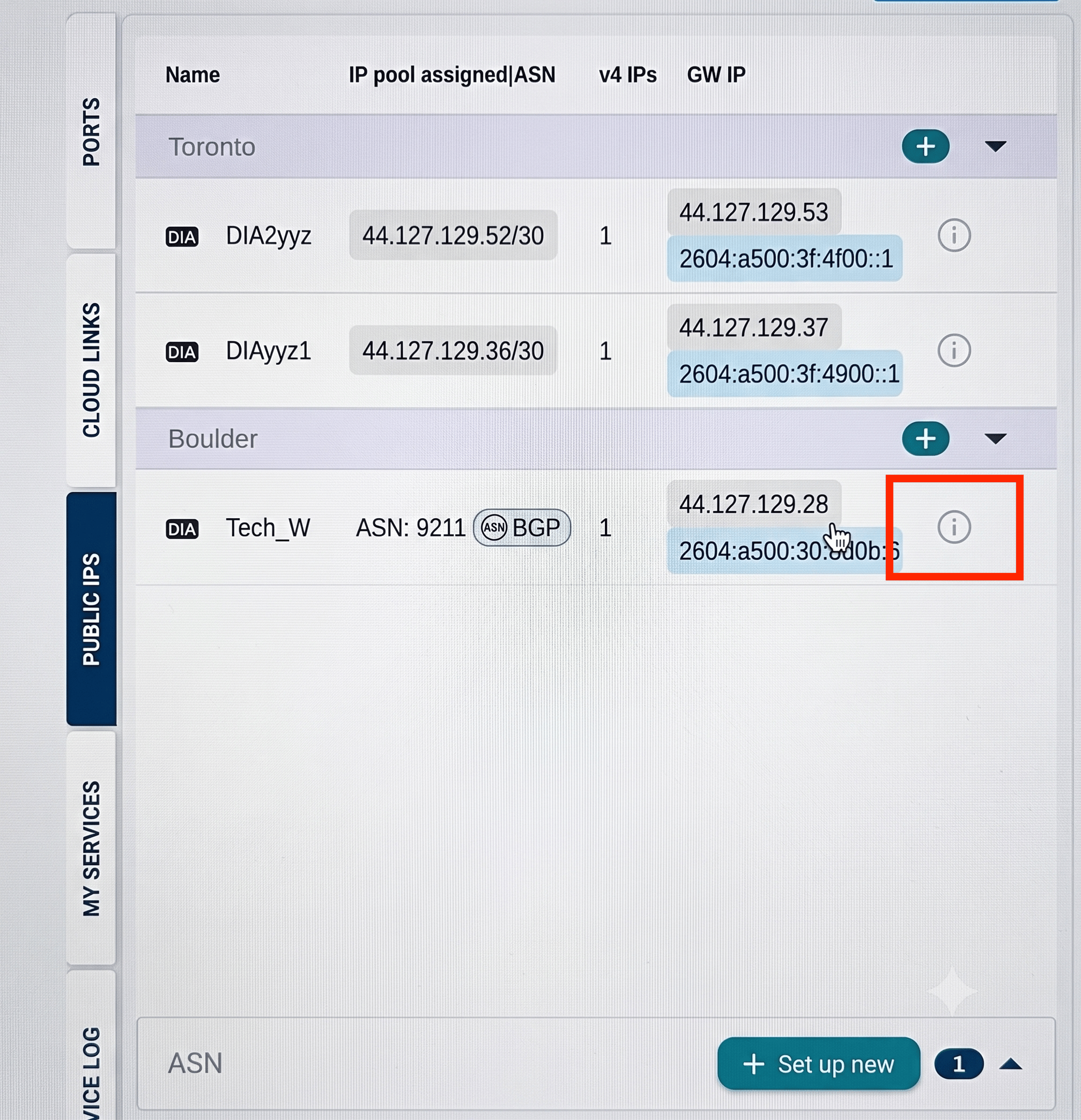
You can find configuration details, such as the MD5 password, under **Build Your Network > Public IPs**.
Click the information icon next to your BGP connection.
 ## Configure your router
Because BGP configuration commands vary by router vendor (Cisco, Juniper, Nokia, Palo Alto, and others), the requirements below are vendor-neutral. Refer to your router's documentation for the exact command syntax.
Your router must be configured with:
* An interface or subinterface for the DynamicLink handoff, with the same VLAN ID you selected in the portal (if tagged).
* The IPv4 and/or IPv6 address assigned to the customer side of the connection.
* A BGP process using your approved customer ASN.
* A BGP neighbor pointing to the Zayo peer IP address, with remote ASN set to `6461`.
* The BGP authentication password.
* IPv4 unicast address family activation if IPv4 is used, and IPv6 unicast address family activation if IPv6 is used.
* An outbound route filter that allows only the approved customer prefixes to be advertised.
For dual-stack service, configure and validate IPv4 and IPv6 separately.
Your router must be able to reach the Zayo BGP peer IP address over the service interface, and TCP port 179 must be allowed through any firewall or ACL in the path.
For more information, see [Configure Your Router for DIA BGP](dia-bgp-router).
## Configure your router
Because BGP configuration commands vary by router vendor (Cisco, Juniper, Nokia, Palo Alto, and others), the requirements below are vendor-neutral. Refer to your router's documentation for the exact command syntax.
Your router must be configured with:
* An interface or subinterface for the DynamicLink handoff, with the same VLAN ID you selected in the portal (if tagged).
* The IPv4 and/or IPv6 address assigned to the customer side of the connection.
* A BGP process using your approved customer ASN.
* A BGP neighbor pointing to the Zayo peer IP address, with remote ASN set to `6461`.
* The BGP authentication password.
* IPv4 unicast address family activation if IPv4 is used, and IPv6 unicast address family activation if IPv6 is used.
* An outbound route filter that allows only the approved customer prefixes to be advertised.
For dual-stack service, configure and validate IPv4 and IPv6 separately.
Your router must be able to reach the Zayo BGP peer IP address over the service interface, and TCP port 179 must be allowed through any firewall or ACL in the path.
For more information, see [Configure Your Router for DIA BGP](dia-bgp-router).