

Prerequisites
Before creating an ELAN connection, ensure you have:- Three or more provisioned ports in DynamicLink (one for each endpoint you want to connect)
- Sufficient available bandwidth on all ports
- An understanding of which VLANs are available on each port
- A clear network design for your multi-point topology
Create an ELAN connection
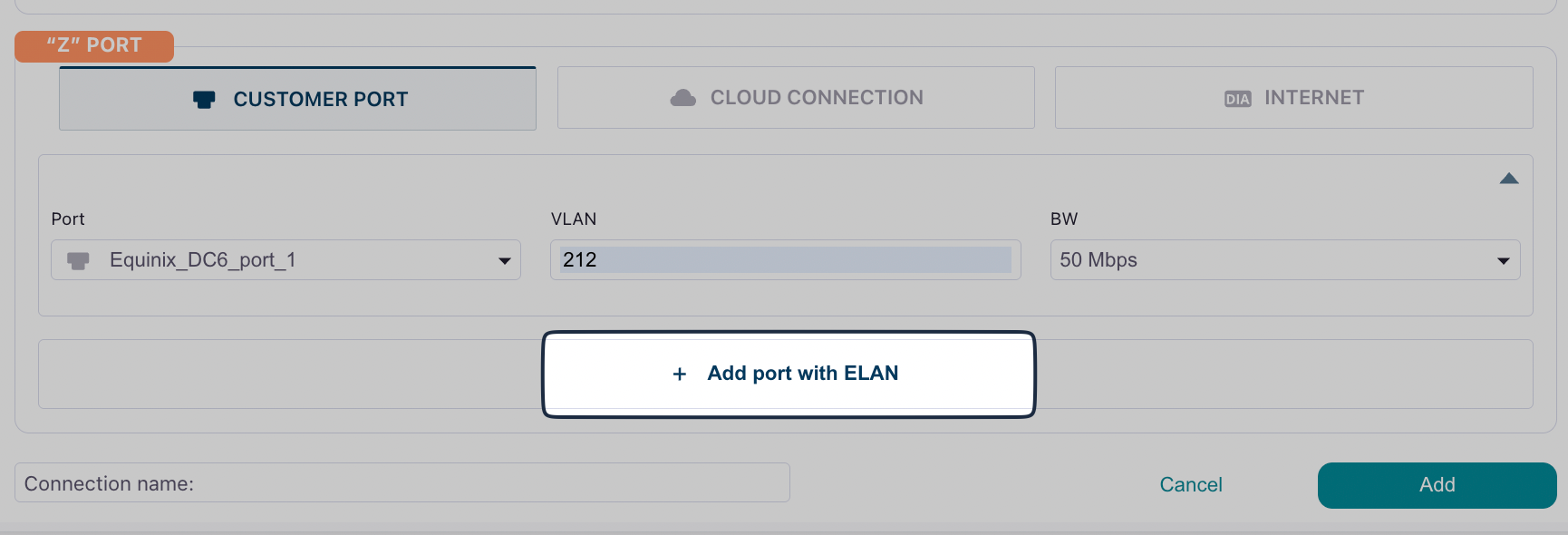
Navigate to Build Your Network > Ports. Click Add a Connection in the upper right or click Add connection next to the port you are using. Complete the following fields: “A” Port Select Customer Port and then complete the following fields:
“Z” Port
Select Customer Port and then complete the fields as described above.
To continue adding ports in your ELAN connection, click Add port with ELAN at the bottom.
Best practices
When creating E-Line connections, consider the following:- Naming Convention: Use clear, descriptive names that include location identifiers (e.g., “NYC-DC1-to-CHI-DC2”)
- Bandwidth: Size your bandwidth based on expected traffic patterns and peak usage
- Redundancy: For critical connections, consider creating redundant E-Line services on separate ports for high availability